

|
|
 |
 |
|
Paypal | |
|
FTP | |
|
CCD | |
|
Buscar | |
|
Trucos | |
|
Trabajo | |
|
Foros | |
|
|||||||
| Registrarse | FAQ | Miembros | Calendario | Guía de estilo | Temas de Hoy |
 |
|
|
Herramientas | Buscar en Tema | Desplegado |
|
#1
 24-04-2026
|
||||
|
||||
|
Efectos en un TDateTimePicker
Estoy usando un código que me facilitó escafandra en el Foro Club Builder para destacar en este elemento determinadas fechas. El código es este:
Código:
#define BOLDDAY(ds, iDay)  \
        if (iDay > 0 && iDay < 32)(ds) |= (0x00000001 << (iDay - 1))
#define  DTM_GETMCSTYLE (DTM_FIRST + 12)
#define  DTM_SETMCSTYLE (DTM_FIRST + 11)

//---------------------------------------------------------------------------
__fastcall TForm1::TForm1(TComponent* Owner)
  : TForm(Owner)
{
  DWORD style = SendMessage(DateTimePicker1->Handle, DTM_GETMCSTYLE, 0, 0);
  SendMessage(DateTimePicker1->Handle, DTM_SETMCSTYLE, 0, style | MCS_DAYSTATE);
}


//---------------------------------------------------------------------------
void __fastcall TForm1::DateTimePicker1DropDown(TObject *Sender)
{
  MONTHDAYSTATE MonthBInfo[3] = {0, 0, 0};

  HANDLE hCalendar = (HANDLE)SendMessage(DateTimePicker1->Handle, DTM_GETMONTHCAL, 0, 0);
  BOLDDAY(MonthBInfo[0], 0);
  BOLDDAY(MonthBInfo[1], 15);
  BOLDDAY(MonthBInfo[2], 0);
  if(hCalendar > 0)
    SendMessage(hCalendar, MCM_SETDAYSTATE, 3, LPARAM(MonthBInfo));
}
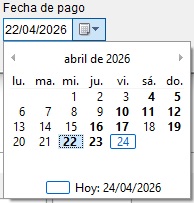 Como veis unos días sí los pone en negrita y otros no. He probado en ese evento con variaciones del código como esta: Código:
void __fastcall TfFacAlb::FecPagoDropDown(TObject *Sender)
{
     MONTHDAYSTATE MonthBInfo[3] = {0, 0, 0};
     Word Year, Month, Day;

     fMenu->Query->Close();
     fMenu->Query->SQL->Text = "SELECT Fecha FROM Factura WHERE TipoDoc = 3 AND NumFactura = :NumFactura";
     fMenu->Query->ParamByName("NumFactura")->AsInteger = StrToInt(pItem->SubItems->Strings[3]);
     fMenu->Query->Open();

     DecodeDate(fMenu->Query->FieldByName("Fecha")->AsDateTime, Year, Month, Day);
     HANDLE hCalendar = (HANDLE)SendMessage(FecPago->Handle, DTM_GETMONTHCAL, 0, 0);
     BOLDDAY(MonthBInfo[0], 0);
     BOLDDAY(MonthBInfo[1], Day);
     BOLDDAY(MonthBInfo[2], 0);
     if (hCalendar > 0)
          SendMessage(hCalendar, MCM_SETDAYSTATE, 3, LPARAM(MonthBInfo));
}
Código:
void __fastcall TfFacAlb::FecPagoDropDown(TObject *Sender)
{
     MONTHDAYSTATE MonthBInfo = 0;
     Word Year, Month, Day;

     fMenu->Query->Close();
     fMenu->Query->SQL->Text = "SELECT Fecha FROM Factura WHERE TipoDoc = 3 AND NumFactura = :NumFactura";
     fMenu->Query->ParamByName("NumFactura")->AsInteger = StrToInt(pItem->SubItems->Strings[3]);
     fMenu->Query->Open();

     DecodeDate(fMenu->Query->FieldByName("Fecha")->AsDateTime, Year, Month, Day);
     HANDLE hCalendar = (HANDLE)SendMessage(FecPago->Handle, DTM_GETMONTHCAL, 0, 0);
     BOLDDAY(MonthBInfo, Day);
     if (hCalendar > 0)
          SendMessage(hCalendar, MCM_SETDAYSTATE, 3, LPARAM(MonthBInfo));
}

|
|
#2
24-04-2026
|
||||
|
||||
|
Cita:
¿Que siempre son los ismos días? ¿Que no pinta ninguno?
__________________
Germán Estévez => Web/Blog Guía de estilo, Guía alternativa Utiliza TAG's en tus mensajes. Contactar con el Clubdelphi  P.D: Más tiempo dedicado a la pregunta=Mejores respuestas.
|
|
#3
24-04-2026
|
||||
|
||||
|
Cita:
|
|
#4
24-04-2026
|
||||
|
||||
|
¿Sabes a qué se refiere la estructura MONTHDAYSTATE?
Aquí explican qué es cada cosa... https://learn.microsoft.com/es-es/wi...set-day-states Cita:
Código:
#define BOLDDAY(ds, iDay)  \
        if (iDay > 0 && iDay < 32)(ds) |= (0x00000001 << (iDay - 1))

case WM_NOTIFY:
        if (((LPNMHDR)lParam)->code == MCN_GETDAYSTATE)
        {
            MONTHDAYSTATE rgMonths[12] = { 0 };
            int cMonths = ((NMDAYSTATE*)lParam)->cDayState;
            for (int i = 0; i < cMonths; i++)
            {
                BOLDDAY(rgMonths[i], 1);
                BOLDDAY(rgMonths[i], 15);
            }
            ((NMDAYSTATE*)lParam)->prgDayState = rgMonths;
            return TRUE;
        }
        break;
|
|
#5
24-04-2026
|
||||
|
||||
|
Gracias por la información, pero en estos temas estoy totalmente perdido y no entiendo lo que quieren decir.

|
|
#6
25-04-2026
|
||||
|
||||
|
Cita:
Código:
void __fastcall TfFacAlb::DateTimePicker1DropDown(TObject *Sender)
{
     MONTHDAYSTATE MonthBInfo[3] = {0, 0, 0};
     Word Year, Month, Day;

     DateTimePicker1->MinDate = FecPago->MinDate;
     DateTimePicker1->MaxDate = FecPago->MaxDate;
     HANDLE hCalendar = (HANDLE)SendMessage(DateTimePicker1->Handle, DTM_GETMONTHCAL, 0, 0);
     for (TDate d = DateTimePicker1->MinDate; d <= DateTimePicker1->MaxDate; d ++)
     {
          DecodeDate(d, Year, Month, Day);
          BOLDDAY(MonthBInfo[0], Day);
          BOLDDAY(MonthBInfo[1], Day);
          BOLDDAY(MonthBInfo[2], Day);

          if(hCalendar > 0)
               SendMessage(hCalendar, MCM_SETDAYSTATE, 3, LPARAM(MonthBInfo));
     }
}
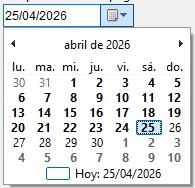 Pero si salgo de ese desplegable, al volver a mostrar el mes me hace lo mismo de antes: uno sí los pone en negrita y otros no. 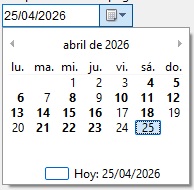 Tengo que ver si hay alguna forma de "resetear" el mes.
|
|
#7
12-08-2026
|
||||
|
||||
|
No había visto este tema hasta ahora.
Para que el marcado de días sea consistente hay que crearse un componente o hacer un subclassing del TDateTimePicker. Si trabajasemos sobre un TMonthCalendar, bastaría con interceptar en el Formulario los mensajes WM_NOTIFY. Esto es debido a que un control windows envia las notificaciones a su parent, en el caso de TMonthCalendar las envía al Formulario pero en el caso de TDateTimePicker, lleva un MonthCalendar desplegable que notifica al DateTimePicker. Se debe gestionar la notificación MCN_GETDAYSTATE de esta manera: Código:
void __fastcall TForm1::SubClassTimePickerProc(TMessage& Message)
{
  if(Message.Msg == WM_NOTIFY){
    LPNMDAYSTATE PNMD = (LPNMDAYSTATE)Message.LParam;
    if(PNMD->nmhdr.code == MCN_GETDAYSTATE){
      // Poner en negrita del dia 1 al 25 del mes
      for(int i = 0; i < PNMD->cDayState; i++){
        DayStates[i] = 0;
        for(int d = 1; d <= 25; d ++){
          DayStates[i] |= (1 << (d - 1));
        }
      }
      PNMD->prgDayState = DayStates;
      Message.Result = 0;
    }
  }

  OldTimePickerProc(Message);
}
Código:
//---------------------------------------------------------------------------

#ifndef Unit1H
#define Unit1H
//---------------------------------------------------------------------------
#include <Classes.hpp>
#include <Controls.hpp>
#include <StdCtrls.hpp>
#include <Forms.hpp>
#include <ComCtrls.hpp>
//---------------------------------------------------------------------------

typedef void __fastcall(__closure *PWndProc)(Messages::TMessage &Message);


class TForm1 : public TForm
{
  __published:	// IDE-managed Components
  TDateTimePicker *DateTimePicker1;
  TMonthCalendar *MonthCalendar1;

  private:	// User declarations
  PWndProc OldTimePickerProc;

  MONTHDAYSTATE DayStates[12]; // debe vivir mientras el popup esté abierto
  void __fastcall WMNotify(TMessage &Message);
  void __fastcall SubClassTimePickerProc(TMessage& Message);

  public:		// User declarations
  __fastcall TForm1(TComponent* Owner);

BEGIN_MESSAGE_MAP
  MESSAGE_HANDLER(WM_NOTIFY, TMessage, WMNotify)
END_MESSAGE_MAP(TForm)
};

//---------------------------------------------------------------------------
extern PACKAGE TForm1 *Form1;
//---------------------------------------------------------------------------
#endif
Código:
//---------------------------------------------------------------------------

#include <vcl.h>
#pragma hdrstop

#include "Unit1.h"
//---------------------------------------------------------------------------
#pragma package(smart_init)
#pragma resource "*.dfm"

#define  DTM_GETMCSTYLE (DTM_FIRST + 12)
#define  DTM_SETMCSTYLE (DTM_FIRST + 11)

TForm1 *Form1;

//---------------------------------------------------------------------------
void __fastcall SetSubCass(TWinControl *WC, PWndProc newProc, PWndProc *oldProc)
{
  *oldProc = WC->WindowProc;
  WC->WindowProc = newProc;
}
//---------------------------------------------------------------------------

//---------------------------------------------------------------------------
__fastcall TForm1::TForm1(TComponent* Owner)
  : TForm(Owner)
{
  DWORD style = SendMessage(DateTimePicker1->Handle, DTM_GETMCSTYLE, 0, 0);
  SendMessage(DateTimePicker1->Handle, DTM_SETMCSTYLE, 0, style | MCS_DAYSTATE);
  SendMessage(MonthCalendar1->Handle, DTM_SETMCSTYLE, 0, style | MCS_DAYSTATE);
  SetSubCass(DateTimePicker1, SubClassTimePickerProc, &OldTimePickerProc);
}
//---------------------------------------------------------------------------

void __fastcall TForm1::WMNotify(TMessage &Message)
{
  LPNMDAYSTATE PNMD = (LPNMDAYSTATE)Message.LParam;
  if(PNMD->nmhdr.code == MCN_GETDAYSTATE){
    for(int i = 0; i < PNMD->cDayState; i++){
      DayStates[i] = 0;
      // Poner en negrita del dia 1 al 25 del mes
      for(int d = 1; d <= 25; d ++){
        DayStates[i] |= (1 << (d - 1));
      }
    }
    PNMD->prgDayState = DayStates;
    Message.Result = 0;
  }
  else{
    // Deja que VCL procese el resto de notificaciones normalmente
    TForm::Dispatch(&Message);
  }
}
//---------------------------------------------------------------------------

void __fastcall TForm1::SubClassTimePickerProc(TMessage& Message)
{
  if(Message.Msg == WM_NOTIFY){
    LPNMDAYSTATE PNMD = (LPNMDAYSTATE)Message.LParam;
    if(PNMD->nmhdr.code == MCN_GETDAYSTATE){
      // Poner en negrita del dia 1 al 25 del mes
      for(int i = 0; i < PNMD->cDayState; i++){
        DayStates[i] = 0;
        for(int d = 1; d <= 25; d ++){
          DayStates[i] |= (1 << (d - 1));
        }
      }
      PNMD->prgDayState = DayStates;
      Message.Result = 0;
    }
  }

  OldTimePickerProc(Message);
}
|
|
|
|
 Temas Similares
|
||||
| Tema | Autor | Foro | Respuestas | Último mensaje |
| Efectos de animacion en FMX | Jose Roman | FireMonkey | 2 | 25-04-2022 19:17:08 |
| Efectos de Ventanas | gerald | Gráficos | 10 | 30-10-2008 23:49:49 |
| Efectos del Calor | FGarcia | La Taberna | 13 | 14-05-2008 00:12:00 |
| Efectos a Imagenes | sac | Gráficos | 7 | 18-07-2007 21:13:58 |
| Efectos con imagen | turminator | Gráficos | 1 | 08-05-2006 10:12:29 |
 |
|


![Avatar de Neftali [Germán.Estévez]](image.php?u=3561&dateline=1185205509)


 Mode Lineal

